PVS Targets Fail with LoadImage Error: Access Denied After a Windows Update
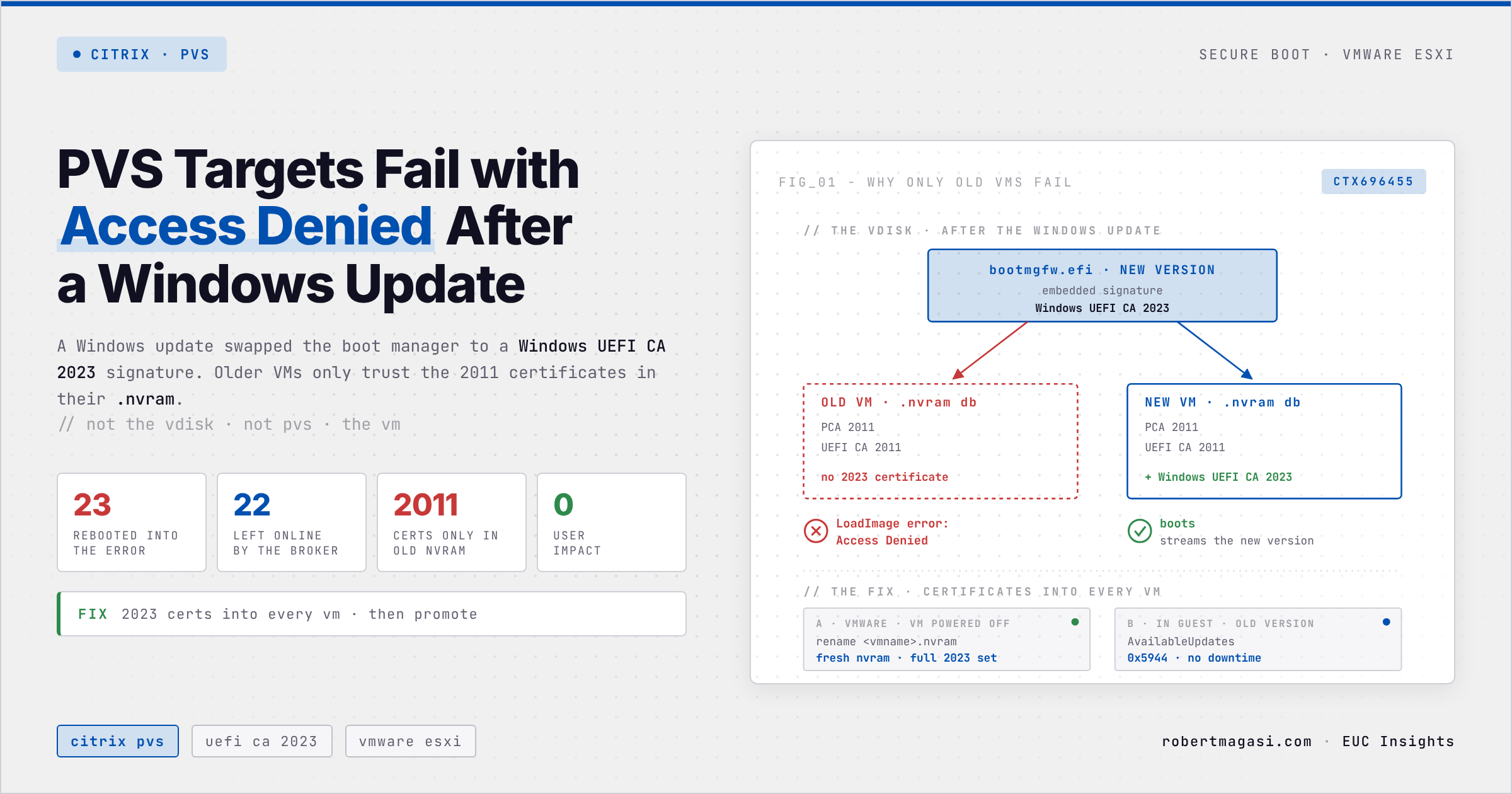
After a Windows update on the vDisk, older Citrix PVS targets on VMware refused to boot with LoadImage error: Access Denied. The vDisk was fine, the Secure Boot keys in each VM's NVRAM were not.
On Monday one PVS target refused to boot a freshly updated vDisk version. Two other test targets booted the same version without complaint, so I renamed the broken VM’s .nvram file, watched it come back, and wrote it off as one odd VM. On Thursday night the reboot schedule rolled that version out to production. Half of the Desktop servers never came back.
The odd VM wasn’t odd. It was just the first one old enough. The October 2026 Windows update had swapped the boot manager inside the image for one signed by Microsoft’s new 2023 Secure Boot certificate, and every long-lived VM in the farm still carried only the 2011 certificates in its NVRAM.
Quick answer
If PVS targets on VMware stop with
LoadImage error: Access Deniedafter a Windows update on the vDisk, the VMs’ NVRAM is missing the Windows UEFI CA 2023 certificate. Roll back to the previous vDisk version, then get the 2023 certificates into every target, through Windows servicing while the old version still runs (no downtime, that’s what fixed our farm), or by regenerating its NVRAM (power off, rename the.nvramfile) for a stubborn single VM.
The Situation
The first target stopped here:
1
2
3
4
5
Citrix Provisioning 7.41.0.1 UEFI streaming
...
Boot from vDisk...
LoadImage error: Access Denied
Streaming aborted.
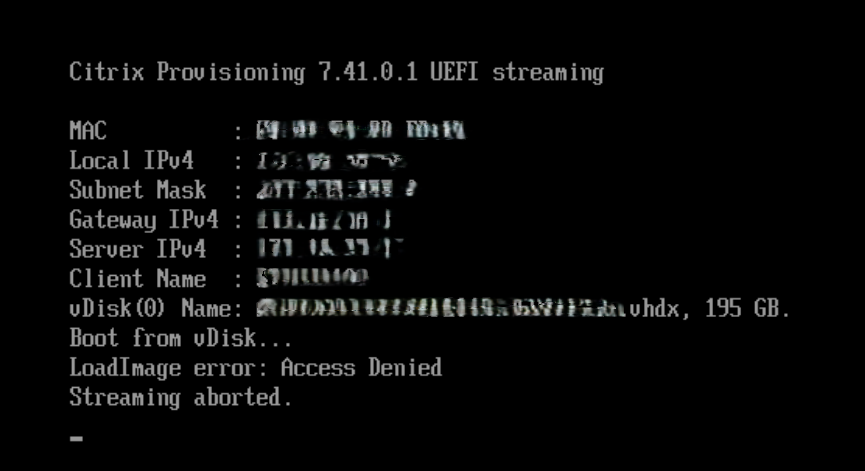 The bootloader reached the PVS server, matched the device and found the vDisk. The failure comes after all of that.
In production the nightly reboot schedule took the first batch of machines straight into the same screen. The Delivery Controller then gave up on the cycle:
1
2
3
The Citrix Broker Service has terminated the processing of the 'GroupReboot' for 'Desktop'.
The reboot cycle (UID = '8347') ended with the final state 'Abandoned'.
Summary: '23' machines successfully rebooted, '0' machines failed to reboot, '22' machines were not processed.
“Successfully rebooted” is doing a lot of work there. The Broker only knows the power action went through, not that 23 machines were sitting on a firmware error. The number that saved the night is the other one. Twenty-two machines were never touched, stayed on the old version, and carried the users while we rolled back.
Environment
- Citrix Provisioning 2402 LTSR CU3, UEFI bootloader 7.41.0.1, BDM partition boot, Secure Boot enabled
- VMware ESXi 8.0 Update 3k (build 25595708), VM hardware version 19, no vTPM
- vDisk Windows Server 2019, old version build 17763.7434, updated version build 17763.9376 (October 2026 cumulative update KB5126651)
Why Only Some Targets Fail
The boot screen clears PVS before you’ve opened a single console. The bootloader got an IP, reached the server, matched the device record and resolved the vDisk, so licensing, the device record and store permissions are fine. The BDM partition had been updated before the rollout anyway.
LoadImage error: Access Denied is the firmware’s answer, not a PVS error. After Boot from vDisk... the PVS bootloader pulls bootmgfw.efi out of the vDisk and hands it to UEFI to load. Secure Boot checked the signature and said no.
Secure Boot keys (PK, KEK, db, dbx) live in each VM’s .nvram file on the datastore, not in the vDisk. That’s why renaming the file fixed the first target, and why targets sharing one vDisk can behave differently. I put a failing target next to a working one and listed the certificates in each variable with Get-SecureBootUEFI:
| Old target (old NVRAM) | Working target | |
|---|---|---|
| KEK | Microsoft Corporation KEK CA 2011 only | + Microsoft Corporation KEK 2K CA 2023 |
| db | VMware entries, Microsoft Corporation UEFI CA 2011, Microsoft Windows Production PCA 2011 | + Windows UEFI CA 2023, Microsoft UEFI CA 2023, Microsoft Option ROM UEFI CA 2023 |
| dbx | identical | identical |
No 2023 certificate anywhere on the old target. dbx is byte-identical on both, so revocations had nothing to do with it. The new boot manager’s embedded signature chains to Windows UEFI CA 2023, and a db without that certificate can’t trust it.
Get-AuthenticodeSignatureonbootmgfw.efisent me the wrong way first. It reports Microsoft Windows Production PCA 2026 as the issuer, because it reads the Windows catalog signature (SignatureTypereturnsCatalog). The firmware never sees catalogs. To check what Secure Boot actually validates, read the embedded Authenticode signature from the file itself.
Which certificates a VM carries depends on when, and from what, its NVRAM was created. Broadcom’s KB 423893 spells it out:
| VM created on | KEK and db |
|---|---|
| ESXi 8.0 U2 or later, HW version 14+ | 2023 certificates included |
| Older ESXi, or HW version 13 | 2011 certificates only |
A template with a .nvram file | inherited from the template |
Our production VMs predate that. The two test VMs that booted were either created later, or had earlier streamed a Windows Server 2022 vDisk that ran the certificate update and left the certificates in NVRAM, which survives standard mode. I didn’t chase it down. The fix is the same either way.
Nobody Triggered It
I assumed someone had set the Secure Boot update registry values during the maintenance session. Nobody had. Windows did it on its own, and the updated vDisk version keeps the evidence.
Under HKLM\SYSTEM\CurrentControlSet\Control\SecureBoot\Servicing, ConfidenceLevel reads High Confidence and ConfidenceUpdateType reads 22852, which is 0x5944, the full certificate and boot manager update. The System log (source Microsoft-Windows-TPM-WMI) shows how it got there. In late August, event 1801 still reported BucketConfidenceLevel: Under Observation - More Data Needed for the VMware VM bucket. The October update brought the High Confidence rating for that bucket (its BucketConfidenceData.cab is hard-linked into a WinSxS folder versioned 10.0.17763.9376), and event 1808 lists what Windows then applied:
1
UpdateType: Windows UEFI CA 2023 (DB), Option ROM CA 2023 (DB), 3P UEFI CA 2023 (DB), KEK 2023, Boot Manager (2023)
That order, certificates first and boot manager second, is fine on a physical PC. On PVS it’s the whole problem. The maintenance VM got the certificates. The vDisk got the boot manager. Every other target got only the boot manager.
This isn’t tied to one image or to October. Any vDisk does the same in its maintenance session once its device bucket reaches High Confidence, other hypervisors and Windows releases get there earlier or later, and an admin can trigger it by hand at any time. MCS catalogs have their own version of the problem (CTX696696).
The Solution
1. Roll back
Assign the previous vDisk version to the failed targets. Its boot manager is still signed under PCA 2011, which their db trusts, and they boot straight away.
The machines that missed their nightly reboot keep filling their write cache until the next one. As a precaution I grew the write cache disk on every production VM by 20 GB and extended the volume in Windows. Growing the VMDK alone does nothing, the cache file only sees the volume.
2. Get the 2023 certificates into every VM
Citrix covers this in CTX696455. The obvious shortcut is to switch Secure Boot off on the targets, temporarily so Windows can write the certificates itself, or for good. I didn’t take it. The firmware setting needs a powered-off VM, so it costs the same downtime as regenerating the NVRAM, and switching it off for good leaves the farm without boot-chain protection. That leaves two real options.
Option A, regenerate the NVRAM. Proven on two targets.
- Put the machine into maintenance mode in Studio and drain it, which also stops the Delivery Controller from powering it on halfway through
- Shut down the guest and wait until vCenter shows Powered Off. A guest restart isn’t enough, the VM process keeps the
.nvramfile open - Rename
<vmname>.nvramin the datastore browser - Power on. ESXi creates a fresh NVRAM with KEK 2023, Windows UEFI CA 2023 and Microsoft UEFI CA 2023. Option ROM CA 2023 isn’t seeded at creation, Windows adds it itself at the next boot (event 1044)
- Take the machine out of maintenance mode
With BDM boot the boot order is just the disk, so losing it costs nothing. Check for vTPM first, its state lives in the NVRAM and goes with it. On ESXi 8.0 U3j and later, uefi.secureBoot.db.resetOnce = TRUE in the VM’s advanced settings resets db alone at the next power-on, which is easier to script than the rename but still needs the power-off (CTX696455).
Option B, let Windows write the certificates. Proven on one target, no downtime. While the targets still run the old vDisk version, trigger the Secure Boot servicing on each one:
1
2
3
New-ItemProperty -Path HKLM:\SYSTEM\CurrentControlSet\Control\SecureBoot -Name AvailableUpdates -PropertyType DWord -Value 0x5944 -Force
Start-ScheduledTask -TaskPath '\Microsoft\Windows\PI\' -TaskName 'Secure-Boot-Update'
[System.Text.Encoding]::ASCII.GetString((Get-SecureBootUEFI db).bytes) -match 'Windows UEFI CA 2023'
The certificates land in the VM’s NVRAM, which survives standard mode. The registry change lands in the write cache and is gone at the next reboot. Never run this on a maintenance or private-mode device, where it would stick in the vDisk.
On this Server 2019 build, event 1036 confirmed the db update within seconds and the last line returned True. That’s only the first stage. The KEK and the other 2023 certificates wait for a reboot (event 1800), and standard mode throws that pending state away. It doesn’t matter. Windows UEFI CA 2023 alone is enough to boot the updated version, and that version’s own servicing finishes the job. Three days later the target rebooted into it, booted, and within one second added Option ROM CA 2023 (1044), Microsoft UEFI CA 2023 (1045) and the KEK (1043). No power-off, no rename.
The script below wraps those three lines. Without parameters it only reports KEK, db, AvailableUpdates and UEFICA2023Status. With -Apply it triggers the update, waits, lists the Secure Boot events and ends with PASS, PARTIAL or FAIL. Run it again without -Apply after the reboot to confirm the certificate survived.
⬇ Download Test-SecureBootNvramUpdate.ps1
For the rest of production there’s a bulk version. It reads the targets from the delivery group, runs the same trigger over WinRM on every target that still lacks the certificate, and ends with a table of who’s done and who still needs the .nvram rename. Run it without -Apply first to see the scope, then with it, then once more to confirm. That’s how the rest of production got its certificates.
⬇ Download Invoke-SecureBootCertRollout.ps1
3. Upgrade PVS
Citrix Provisioning 2402 LTSR CU4 ships a bootstrap signed under the new certificates, and CTX696455 lists the upgrade as a required step. It won’t fix this boot failure on its own. The firmware refuses the new boot manager as long as the VM’s db lacks the certificate, whatever version of PVS streams it. Update the BDM partitions after the upgrade. A bootloader signed under Microsoft UEFI CA 2023 also needs that certificate in every target’s db, one more reason not to stop at the first stage of option B.
Don’t revoke the 2011 certificates with Microsoft’s manual procedure. Citrix says in CTX696455 that doing so “will prevent the PVS boot program from running”. The revocation payloads already ship in the image (
dbxupdate.bin,DBXUpdateSVN.bin), they just aren’t part of0x5944.
4. Check before the next patch cycle
Run this on every target before it moves to a vDisk version with the new boot manager. False means it will fail:
1
[System.Text.Encoding]::ASCII.GetString((Get-SecureBootUEFI db).bytes) -match 'Windows UEFI CA 2023'
The Result
Production was back on the previous vDisk version the same night, and users never noticed. Two targets with a regenerated NVRAM boot the updated version. The hosts already run ESXi 8.0 U3k, later than the 8.0 U3j Citrix asks for, so nothing has to change on the VMware side.
Option B worked end to end on the first test target, which took the in-guest route from the old version to the full 2023 set without a single power-off. So the rest of production went the same way: the bulk script on every target, which wrote the certificate everywhere and left nothing for the .nvram rename, then the updated version back on the reboot schedule. The next cycle rebooted the whole farm into it without a single failure.
Related
- Automating Citrix Server Reboots - the nightly reboot cycle is where this surfaced, and the Broker’s “Abandoned” state is what kept half the servers online
- Citrix Session Shadowing - Post-Jan 2026 Fix - another Citrix feature broken by a Microsoft monthly update, with a workaround that ships through policy
Sources
- Citrix, VMware and XenServer based PVS Targets using Secure Boot Become Unbootable After Applying Windows Updates to the vDisk (CTX696455)
- Citrix, VDA Boot Failure After MCS Catalog Update Due to Secure Boot 2023 Certificate (CTX696696)
- Citrix, Provisioning 2402 LTSR Cumulative Update 4
- Citrix, Windows Secure Boot certificate expiration and CA updates
- Microsoft, Registry key updates for Secure Boot: Windows devices with IT-managed updates (KB5068202)
- Microsoft, Frequently asked questions about the Secure Boot update process
- Broadcom, Secure Boot Certificate Expirations and Update Failures in VMware Virtual Machines (KB 423893)
- Broadcom, Secure Boot Custom Certificates (KB 377306)
- Broadcom, Build numbers and versions of VMware ESXi (KB 316595)
Verified against the environment described above in October and November 2026. Option A on two targets, option B on every remaining production target.
Patched a PVS or MCS image this year and seen this, or found a cleaner way to update the NVRAM at scale? Reach out on LinkedIn.
This post was written with assistance from Claude (Anthropic) as a drafting and editing tool. All technical content, solutions, and recommendations reflect my own hands-on experience and professional judgment.