StoreFront Keyword Trick for Session Affinity
How native Citrix StoreFront keywords and VDA tags solved a production escalation - and avoided a six-figure licensing bill. No custom code required.
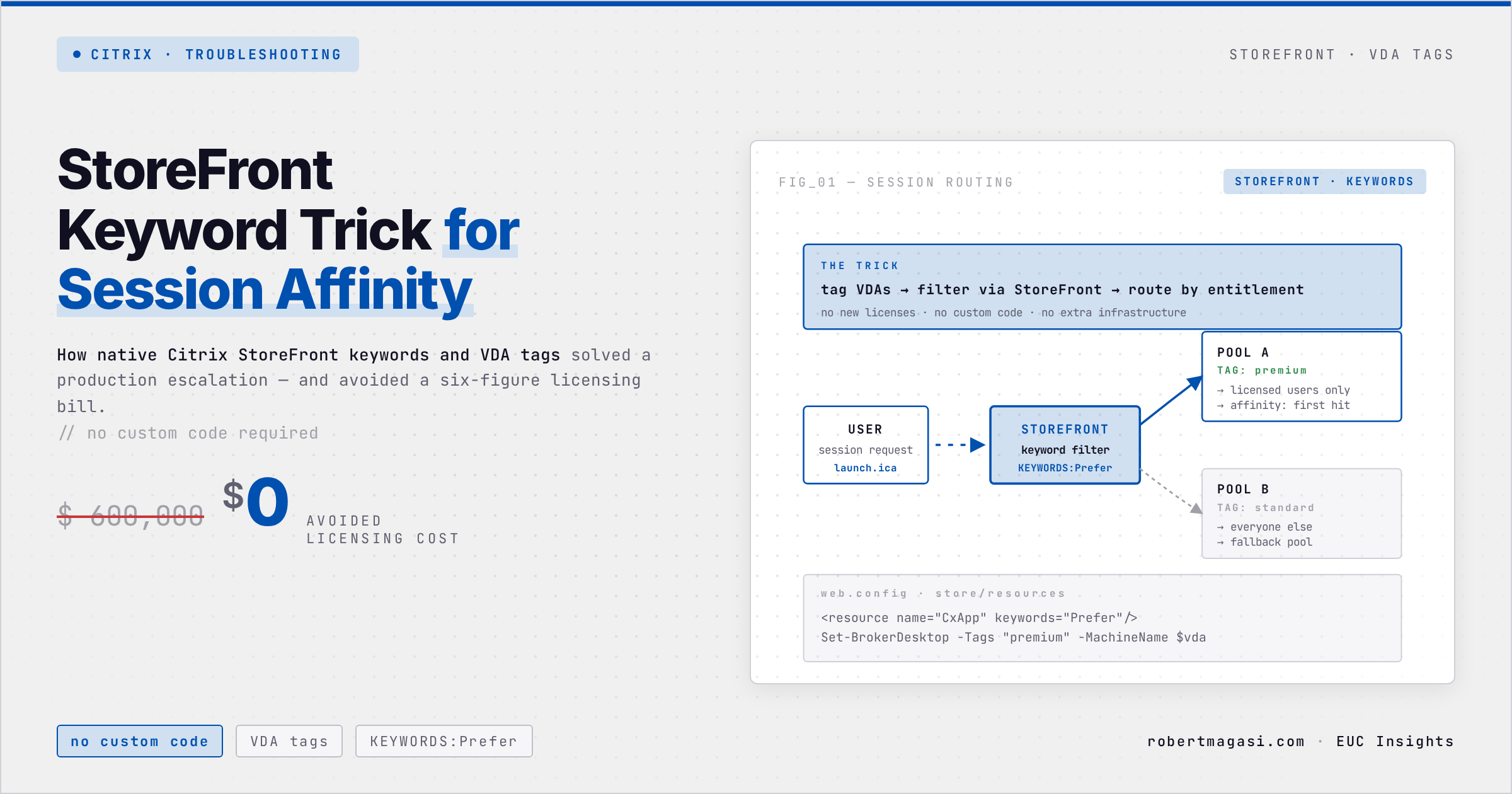
I was already on the way home when my manager called. The customer was escalating - executive level, production disrupted, and the options on the table were custom development or a six-figure licensing spend. I put everything else aside the next day and started from scratch. What I found was a solution built entirely from native Citrix features that nobody had thought to combine.
Quick answer
If shared accounts must never land on the same Citrix worker, combine four native features: a StoreFront store per endpoint group set through GPO, a keyword on the published resource that only its store shows, a matching tag on each VDA in a single Delivery Group, and per-worker FSLogix
VHDLocations. No custom code, no extra licences.
The Situation
The customer ran an RDSH environment with FSLogix Profile Containers and a fleet of non-personalised accounts (Service-Account-A, Service-Account-B, Service-Account-C, and so on) that all needed access to a shared backend application. Whenever two of those accounts landed on the same Citrix worker server simultaneously, the backend produced errors or failed outright. It couldn’t handle the collision.
The obvious fix would have been converting the accounts to personalised users. That meant buying hundreds of additional backend application licences, a six-figure spend the customer wasn’t going to approve. Several colleagues and vendors had already told them the only alternatives were expensive custom development or a major architectural change.
Environment
- Citrix Server OS (RDSH) VDAs in a single Delivery Group, tagged per worker
- StoreFront with one store per endpoint group, filtered by keyword
- Citrix Workspace app on the endpoints, store URL set through GPO
- FSLogix Profile Containers,
VHDLocationsset per worker through GPO
My Task
I had to solve this without converting to personalised accounts. The constraint was strict: those accounts must never land on the same worker at the same time. Ever.
The Solution: Four Layers, All Native Citrix
The conflicts came down to one thing, simultaneous sessions on the same worker. The fix was strict session affinity, with each account permanently bound to its own dedicated worker.
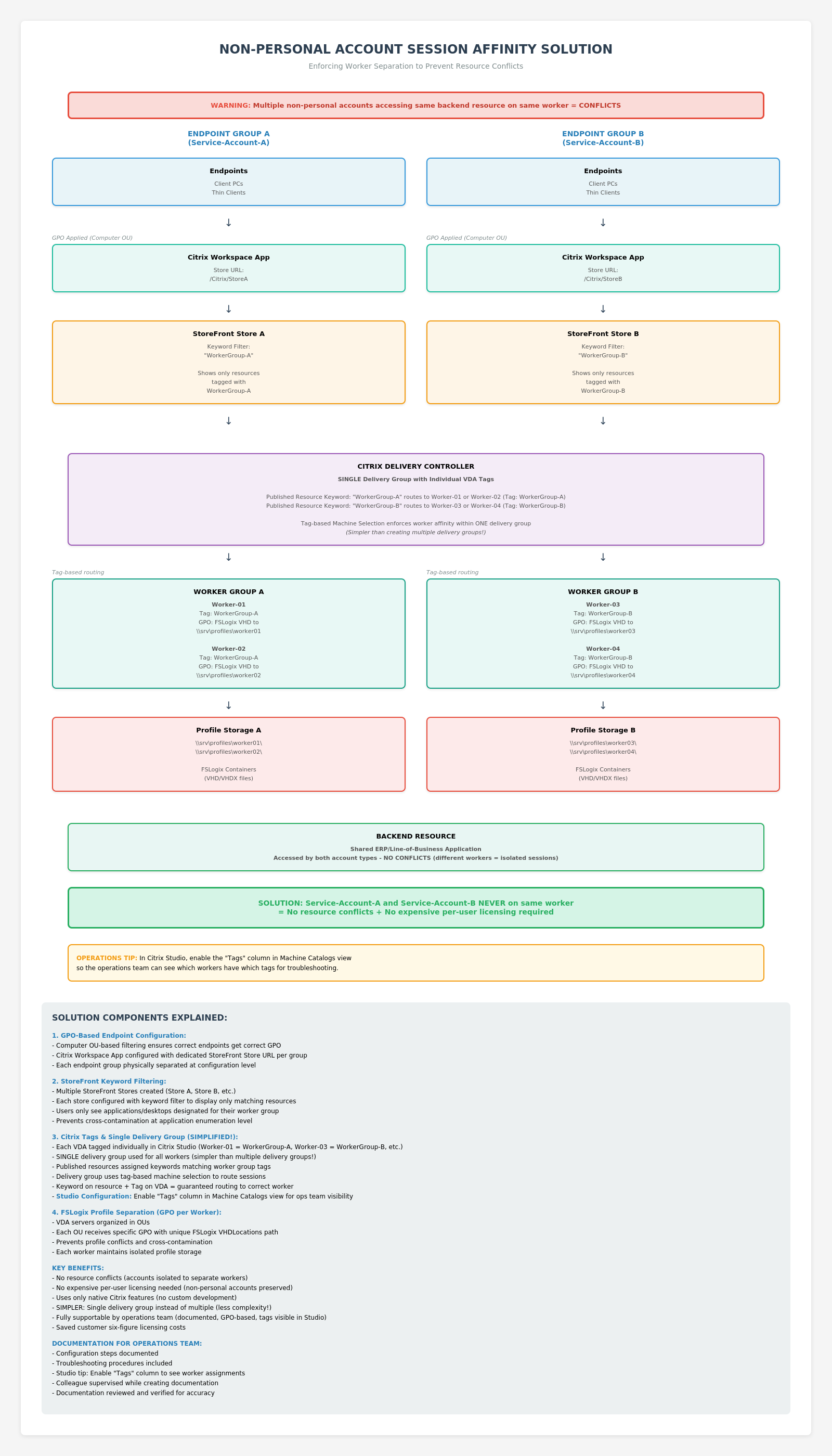 Full architecture diagram showing the four-layer session affinity solution.
Here’s how I built it using only native Citrix features:
Layer 1 - Endpoint Routing via GPO
I configured Citrix Workspace App via Group Policy to point each endpoint group to a dedicated StoreFront store URL.
- Endpoint Group A →
https://storefront.company.com/Citrix/StoreA - Endpoint Group B →
https://storefront.company.com/Citrix/StoreB
GPO filtering based on computer OU or security group applied the correct Workspace App settings automatically. Endpoints never needed manual configuration.
Layer 2 - StoreFront Keyword Filtering
In Citrix Studio, I added Keywords to the published applications/desktops. In the StoreFront stores, I configured each store to only display resources matching a specific keyword.
- Store A only shows resources tagged with keyword
WorkerGroup-A - Store B only shows resources tagged with keyword
WorkerGroup-B
This means users connecting through Store A can only ever see and launch resources destined for Worker Group A. Cross-contamination at the enumeration level is impossible.
Layer 3 - Citrix Tags on Individual Workers
Multiple Delivery Groups was the first shape the solution wanted to take. I ruled it out quickly, not because it wouldn’t work technically, but because it would create something the ops team couldn’t reason about. One Delivery Group with tagged VDAs is something you can explain in two sentences. So rather than creating multiple Delivery Groups, I tagged each VDA individually in Citrix Studio and used a single Delivery Group.
- Worker-01 → Tag:
WorkerGroup-A - Worker-02 → Tag:
WorkerGroup-A - Worker-03 → Tag:
WorkerGroup-B - Worker-04 → Tag:
WorkerGroup-B
The combination of the keyword on the published resource and the tag on the VDA routes the session to the correct worker every time. One Delivery Group. No custom brokering logic. No code.
Layer 4 - FSLogix Profile Separation via GPO
To prevent profile conflicts, I organised the VDA servers into separate OUs in Active Directory and applied worker-specific GPOs setting unique FSLogix VHDLocations paths per worker:
- Worker-01 →
\\srv\profiles\worker01 - Worker-02 →
\\srv\profiles\worker02 - Worker-03 →
\\srv\profiles\worker03 - Worker-04 →
\\srv\profiles\worker04
Each worker maintains completely isolated profile storage, regardless of which account connects.
The Result
The solution went into production and the conflicts stopped. The non-personalised account model was preserved entirely. The customer avoided the six-figure licensing bill they had been facing. Native Citrix features only, no custom development, no major architecture changes, no new licences.
One operational detail worth keeping in mind: enable the Tags column in Citrix Studio’s Machine Catalogs view before you hand the solution over. Without it, the routing logic is invisible to anyone maintaining the environment, and an ops engineer diagnosing a routing issue is looking for something they can’t see. With it, the same diagnosis takes two minutes.
Related
- FSLogix Copy=3, the redirections.xml Trick for Non-Persistent VDI - FSLogix Profile Containers again, this time a performance problem solved in the profile configuration instead of the infrastructure
Verified against the environment described above in March 2026.
Have you used StoreFront keywords in a similar way? I’d be interested to hear other creative uses of this feature - reach out on LinkedIn.
This post was written with assistance from Claude (Anthropic) as a drafting and editing tool. All technical content, solutions, and recommendations reflect my own hands-on experience and professional judgment.